
# Configure Mobile App
The Psono mobile app can be configured manually by each user or centrally by administrators. Central configuration is useful if you want to preconfigure the server URL and disable manual server changes for managed devices.
The configuration value is the same config.json format that is used by the webclient and QR configuration.
# Configuration (manually)
A user can manually configure the mobile app with the Remote Config feature.
The user enters the server address and starts Remote Config. The app connects to the server, asks for the WEBCLIENT_URL, then connects to the webclient and downloads the config.json.
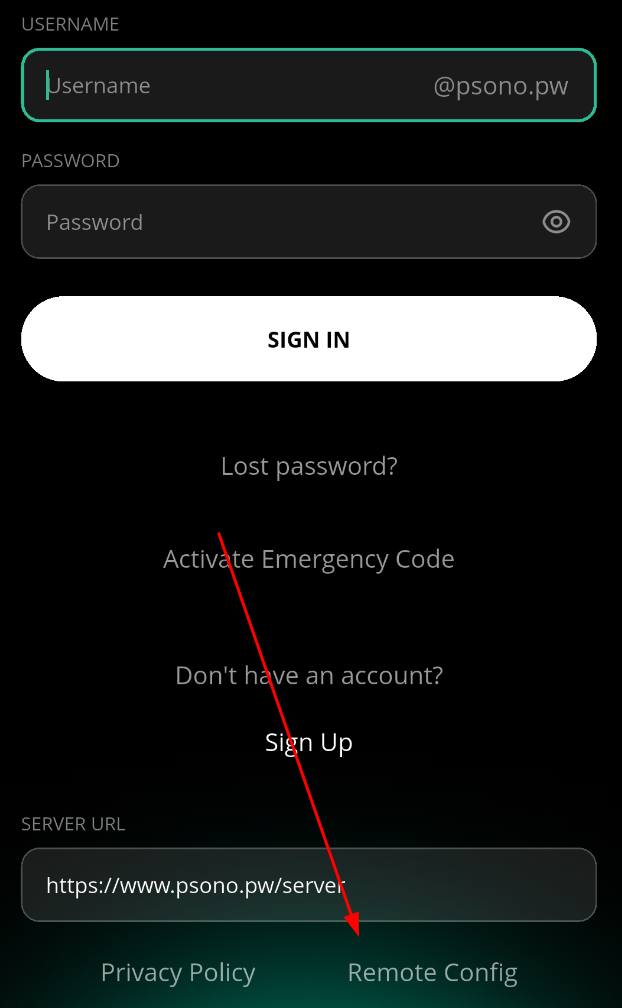
The mobile app can also be configured with a QR config. See Install Mobile App.
# Configuration (with managed configuration)
As an alternative to manual configuration, administrators can configure the mobile app through MDM / EMM managed app configuration.
| Platform | Source |
|---|---|
| Android | Managed app configuration provided by the MDM / EMM solution |
| iOS | Managed App Configuration provided by the MDM solution |
Use the key ConfigJson and set its value to the JSON configuration.
Example:
{
  "backend_servers": [
    {
      "title": "Your Company",
      "url": "https://example.com/server"
    }
  ],
  "base_url": "https://example.com/",
  "allow_custom_server": false,
  "allow_registration": true,
  "allow_lost_password": true
}
Most MDM systems expect this as a string value under the ConfigJson key:
{
  "ConfigJson": "{\"backend_servers\":[{\"title\":\"Your Company\",\"url\":\"https://example.com/server\"}],\"base_url\":\"https://example.com/\",\"allow_custom_server\":false,\"allow_registration\":true,\"allow_lost_password\":true}"
}
The app also accepts the configuration keys directly if your MDM supports structured managed configuration dictionaries.
# Behavior
When a managed configuration is present, the app stores it as a managed configuration and uses the first entry in backend_servers as the server URL.
If the managed configuration is removed, the app removes the managed configuration from its local state. Users can then configure the app manually again.